Email to Text
What is Email to Text?
Email to Text lets you send SMS text messages by sending an email. Convert emails to SMS instantly using your unique gateway domain.
Key Features:
- Send SMS via email from any email client
- Unique gateway domain per account (
[your-gateway-domain].e2t.pagertree.com) - Recipients must have verified phone numbers in your account
- All messages logged in PagerTree interface
info
Email to Text is currently in beta and will require enabling for your account. Please contact support to enable.
How to Send SMS via Email
Email Format:
To: [phonenumber]@[your-gateway-domain].e2t.pagertree.com
Subject: Your message
Body: SMS content
Example:
To: 5551234567@abc123.e2t.pagertree.com
Subject: Server Alert
Body: Database backup completed successfully
Phone Number Format:
- US (without country code): 10 digits (e.g.,
5551234567) - US (with country code): 11 digits (e.g.,
15551234567) - International: Include country code (e.g.,
441234567890for UK) - No spaces, dashes, or formatting
Setup
- Find your gateway domain on the Email to Text page in PagerTree:
- In the navigation menu, go to Advanced > Email2Texts
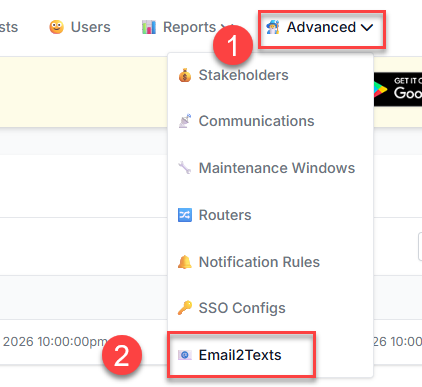
Email to Text Page
- Copy your unique gateway domain (e.g.,
abc123.e2t.pagertree.com)
Email to Text Gateway Domain
- In the navigation menu, go to Advanced > Email2Texts
- Add recipients:
info
Recipients' phone numbers must be verified first. See phone verification guide.
- Go to Users page
- Add phone numbers to user profiles
- Complete phone verification
tip
Test with your own verified number first before sending to others.
Message Tracking
View all Email to Text activity on the Email to Text page:
- Incoming emails and delivery status
- Message history and timestamps
- Delivery errors and troubleshooting info
Troubleshooting
Messages not delivering?
- ✅ Phone number verified in user profile
- ✅ Correct gateway domain used
- ✅ Phone number format (no spaces/dashes)
- ✅ Email to Text enabled for your account
- ✅ Subscription plan supports Email to Text
Message Limits:
- Subject + body combined for SMS
- Long messages split into multiple SMS
- HTML converted to plain text