Blog

πŸ‘‘ What is System Monitoring?

Β· 15 min read
Chance Haller
Business and Operations Development Specialist

As service providers, we understand that 100% uptime for our service isn't an achievable goal, but we do everything in our power to provide our customers with the best possible service and highest availability possible. We implement tools and processes to allow ourselves the ability to respond to issues before they affect our customers. One type of tool we implement is system monitoring tools. The tools give us observability for all of our systems. Access to all of our systems in a clean, easy-to-read dashboard helps us see trends and issues before they become serious problems. Understanding our systems and resolving issues before our customers see them helps improve customer satisfaction and service uptime and helps us meet our SLAs, but what is system monitoring?

πŸ‘‘ Top 5 Best PagerDuty Alternatives in 2024

Β· 9 min read
Austin Miller
Founder of PagerTree

TL;DR Here’s the shortlist of the top 5 best PagerDuty alternatives in 2024:

  1. PagerTree
  2. OpsGenie
  3. iLert
  4. Splunk
  5. OnPage

What is PagerDuty?​

PagerDuty is a leading incident management platform that has been around since 2009. PagerDuty aims to streamline an organization's incident response process. It has features like on-call scheduling, escalation policies, and alerts.

But, PagerDuty can be expensive, has a steep learning curve, and lacks customer support. We’ve compiled a list of the top 5 best PagerDuty alternatives. We specifically looked at features, reliability, and pricing.

πŸ”‘ Understanding Linux File System: A Comprehensive Guide to Common Directories

Β· 6 min read
PagerTree Team
PagerTree Team

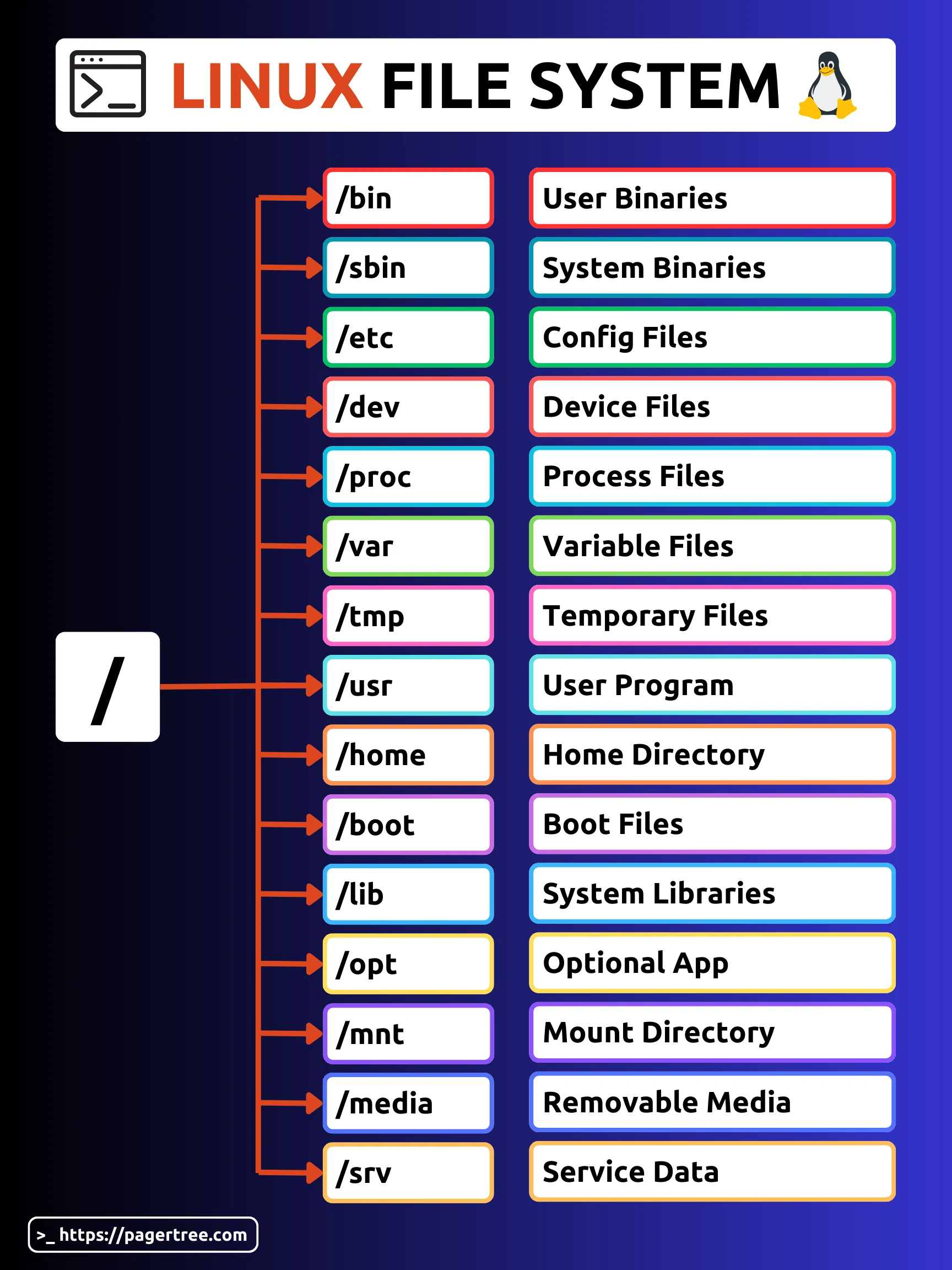
Welcome to an in-depth exploration of the Linux file system! In this comprehensive guide, we'll demystify the various directories found in a typical Linux distribution, explaining their purposes and functionalities. Whether you're a seasoned sysadmin or a curious newcomer, this article will enhance your understanding of the backbone of Linux's structure and operation.

Linux Cheat Sheet

Linux File System Structure

πŸ’Ž Multi-Tenant SSO using Devise

Β· 15 min read
Austin Miller
Founder of PagerTree

Recently while scrolling on Twitter I saw this tweet by John Nunemaker.

Since we had implemented multi-tenant SSO at PagerTree, I thought I could help out. After all, I claimed it was only ~100 lines of code (turns out it is closer to 400). After sharing a raw gist, I realized a blog post would be more helpful to the community.

In this blog post, I want to describe how we implemented multi-tenant SSO at PagerTree to work with any SAML2 identity provider (Okta, Google, Azure, etc.).

πŸ“œ Fly.io migrate-to-v2 Postgres stuck in read-only mode

Β· 9 min read
Austin Miller
Founder of PagerTree

TL;DR​

Fly.io Postgres stuck in read-only mode​

  • During the migration to the Fly.io platforms v2, the provided command (migrate-to-v2) times out if a Postgres cluster doesn't replicate and failover fast enough.
  • The migrate-to-v2 command first puts the database in a read-only state. When the timeout occurs, the command fails to remember to put the database back in a writable state.
  • After the database is read-only, new and existing connections will not be able to write to the database. This caused PagerTree to functionally fail for approximately 45 minutes on July 30, 2023 from 00:30 -> 01:15 UTC.
  • The Postgres cluster can be put back into a writable state with the following commands:
# connect to postgres psql
fly postgres connect -a <postgres_fly_app_name>
# This will show false for the postgres DB
SHOW default_transaction_read_only;
# connect to the production db
\connect <production_db_name>
# This will now show the root cause of issue
SHOW default_transaction_read_only;
# the following command will only work for the current connection
SET default_transaction_read_only TO off;
# connect back to postgres
\connect postgres
# fix the real problem
alter database <production_db_name> set default_transaction_read_only=off;

✨ PromQL Cheat Sheet: A Quick Guide to Prometheus Query Language

Β· 7 min read
Austin Miller
Founder of PagerTree

Prometheus is an open-source monitoring and alerting toolkit that has gained significant popularity in DevOps and systems monitoring. At the core of Prometheus lies PromQL (Prometheus Query Language), a powerful and flexible query language used to extract valuable insights from the collected metrics. In this guide, we will explore the basics of PromQL and provide query examples for an example use case.

πŸ”‘ PowerShell Cheat Sheet: Essential Commands for Efficient Scripting

Β· 8 min read
Austin Miller
Founder of PagerTree

PowerShell is a powerful scripting language and command-line shell that is designed specifically for system administration and automation tasks in Windows environments. Whether you're a seasoned sysadmin or just starting with PowerShell, having a cheat sheet of essential commands at your fingertips can greatly enhance your productivity. In this blog post, we will cover some fundamental PowerShell commands, starting from the basics and gradually progressing to more advanced concepts.

✨ Docker Commands Cheat Sheet

Β· 8 min read
Austin Miller
Founder of PagerTree

In this article I will highlight the 6 key docker commands I use on a daily basis while using Docker in the real world.

By no means is this an extensive list of docker commands. I kept it short on purpose so you could use it as a quick reference guide. I’ve also omitted the topic of building images and the commands that are associated with that.

At the bottom of the page, I’ll also put some good links to other Docker resources I like or frequently use as well as other PagerTree cheat sheet documents. For a full crash course, check out our Learn Docker Series!

CommandShort Description
docker psList running containers
docker exec -it <container name> /bin/shSSH into container
docker restart <container name>Restart a container
docker statsShow running container stats
docker system dfCheck docker daemon disk space usage
docker system prune -afRemove images, networks, containers, and volumes